

Instagram has three primary content surfaces – Stories, Reels, and feed posts – and each one does a different job for a creator account. Spending equal effort on all three is the default mistake, because they reward different behaviors and pay back in different currencies. Here is how to think about where to put your time in 2026, and what to expect in return from each format.
The short answer
Reels grow your audience. Stories deepen your existing audience. Feed posts define who you are when someone visits your profile. None of the three replaces the others, but the order in which most growth-stage creators should prioritize them is: Reels first, Stories second, feed posts third. The accounts winning right now treat Reels as the front door, Stories as the living room, and feed posts as the framed photos on the wall.
Reach breakdown: which format goes to non-followers
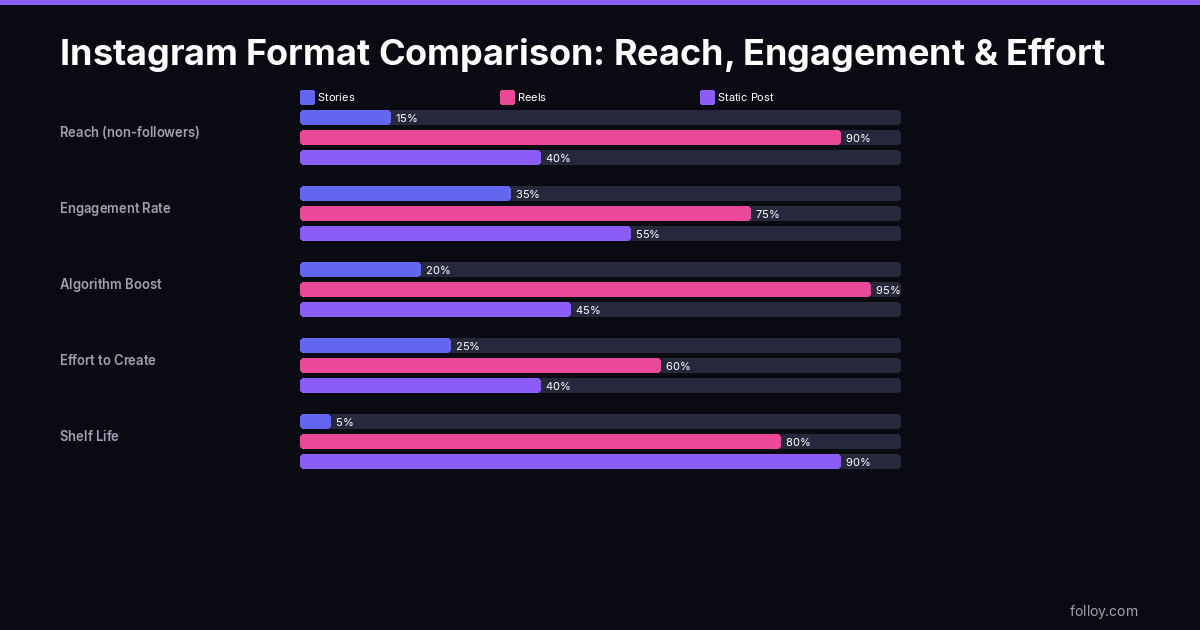
Not all Instagram formats reach beyond your existing follower base equally. The data on this is fairly consistent in 2026, and the gap between formats is large enough to drive content strategy decisions.
- Reels: Non-follower reach typically runs between 60-85% of total reach on a performing Reel. When a Reel gets algorithmic push, the vast majority of viewers are people who don’t follow you. This is the primary growth mechanism for Instagram accounts in 2026.
- Carousels: Strong non-follower reach for Explore-distributed carousels, typically 40-65% non-follower on a carousel that performs well. Lower ceiling than Reels but still meaningfully above single feed photos.
- Single-image feed posts: Non-follower reach typically runs 10-25% on a standard feed photo. The follower feed algorithm means even your existing followers don’t all see it. Feed photos that reach non-followers are almost always driven by a Reels or Stories mention, not organic discovery.
- Stories: Non-follower reach is minimal – typically under 5% of total story viewers. Stories are seen almost entirely by current followers, with occasional spillover from people who tapped through from a shared link or a Reel. This is a feature, not a bug: Stories are designed for depth, not breadth.
The practical implication: if growth is your current goal, time spent on single-image feed posts is being spent on the format with the lowest non-follower reach by a significant margin. That time is better allocated to Reels or carousels, then redirected to feed posts once you have an audience to maintain.
Saves vs shares vs comments: which metric matters for each format
Instagram’s algorithm weights engagement signals differently by format. Posting good content without understanding which metric matters for your format is like optimizing for the wrong output.
Reels: shares and completion rate
Shares are the single highest-weight signal for Reels distribution. When someone shares a Reel to their Story or sends it in a DM, Instagram reads that as a strong endorsement and significantly expands the video’s reach. Completion rate (how many people watch through to the end) is the secondary signal – it affects whether the initial audience batch enjoys the video enough to trigger a wider push.
Comments matter less for Reels than most creators expect. Many high-performing Reels have comment sections that are thin; the share and save behavior is what drives them. Creating Reels that are inherently shareable (relatable, funny, surprising, genuinely useful) is more important than creating Reels that invite debate or comment.
Carousels: saves
Saves are the dominant signal for carousels. A carousel that gets saved is being bookmarked for later reference, which Instagram treats as a strong quality signal. Educational carousels, reference carousels (“save this for when you need it”), and before-and-after carousels all generate disproportionate save rates compared to their view counts. A 5% save rate on a carousel is excellent. For context, a 1% save rate on a single-image post is considered high.
Stories: replies and DMs
For Stories, the engagement signal that matters most to the algorithm is replies – DMs that come from the “reply to story” action. A Story that generates replies (through a question sticker, a poll that prompts people to respond with their own take, or a message that makes followers want to respond personally) deepens the follower relationship in a way that increases the chance your future Reels are served to that follower. Instagram tracks which accounts you interact with in Stories and surfaces more of their other content to you in the feed and Explore.
Single-image posts: comments and saves
For the traditional feed photo, comments signal that the post prompted a reaction worth expressing. Saves signal that it was worth keeping. Both matter more than likes, which have been a weak signal since the platform tested hiding like counts. If you’re posting single-image content, design it to prompt either a save (something reference-worthy) or a comment (something opinion-provoking) rather than just a like.
The content-type matching guide
The format question is not just about reach – it’s about matching the type of content you’re making to the format it performs best in. This table is a starting point, not a rigid rule.
| Content type | Best format | Why |
|---|---|---|
| Tutorial or how-to | Reel or Carousel | Reels if it can be shown in under 60 seconds; Carousel if steps need to be read at the viewer’s pace |
| List or reference content | Carousel | Saves behavior is strongest on scannable reference material |
| Behind-the-scenes or day-in-the-life | Stories | Unpolished content fits the ephemeral nature of Stories; high production value here is counterproductive |
| Opinion or hot take | Reel (talking head) or single post with caption | Reels get more reach; single posts generate more comments per view – choose based on which currency you need |
| Product or portfolio showcase | Carousel or feed photo | Portfolio needs to live permanently in the grid; carousel lets you show multiple angles or pieces |
| Announcements or time-sensitive content | Stories + feed post | Stories reaches existing followers immediately; feed post creates a permanent reference point |
| Entertainment or comedy | Reel | Shareable entertainment drives the share signal that Reels need; static formats underserve this content type |
| Q&A or community conversation | Stories (question sticker) | Generates replies and DMs, which deepen the algorithmic relationship with your existing followers |
Stories strategy: turning retention into reach
Stories are often treated as filler – low-effort content you throw up between “real” posts. That’s the wrong model. Stories are the mechanism by which existing followers stay engaged enough with your account that Instagram keeps showing them your Reels.
Here’s the chain: a follower who interacts with your Stories (votes in a poll, replies to a question, taps through your full story sequence regularly) is building a behavioral signal with Instagram that tells the algorithm they actively want to see your content. When you post a Reel, that follower is more likely to be in the early test batch. Their engagement on your Reel in that early batch is what determines whether the Reel gets pushed wider.
Practical Stories strategy for this model:
- Post 3-5 Stories on the same day as a Reel. Active Stories keep your account icon at the front of your followers’ Stories row. Appearing in that row on the day your Reel goes up increases the chance the same person sees both, and cross-format engagement strengthens the relationship signal.
- Use interactive stickers consistently, not occasionally. Polls and question stickers should appear at least 3-4 times per week. This is not about engagement for its own sake – it’s about building a pool of followers who have a DM interaction history with you. That pool is algorithmically prioritized for your content.
- Show the process behind your Reels. A Story showing “filming today’s video” before the Reel goes live primes your followers to watch the Reel when they see it. Followers who have context are more likely to watch to completion.
- Use Stories to drive saves on carousels. “I just posted a carousel you’ll want to save” as a Story, posted the same hour as the carousel, measurably increases save rate on the carousel. The Stories audience is your most engaged followers – they are the group most likely to save.
Posting too many Stories in a single day causes drop-off. Above 10 frames in a day, completion rate on the sequence falls sharply. Followers tap through the first few and skip the rest, or tap away entirely. Keep the daily count between 3-7, with each frame having a distinct purpose.
Carousels in 2026: the underrated saves machine
Carousels are getting increasing attention in 2026 for a simple reason: they are the one static feed format that consistently generates non-follower reach through Instagram Explore. The saves signal they generate is also algorithmically durable – a carousel saved on day one still counts months later, which static posts don’t benefit from in the same way.
The carousel formats that consistently produce high save rates:
- The “swipe to reveal” structure. First slide hooks with a claim or question; subsequent slides build the argument; final slide delivers the payoff. Works across niches. The swiping behavior itself signals to Instagram that viewers are engaged.
- Before/after or transformation carousels. Fitness results, design transformations, renovation before/after, writing rewrites. High save rate because viewers save the “after” state as inspiration or reference. Works best when the transformation is genuinely surprising.
- Reference or cheat-sheet carousels. “Save this for later” is the explicit call to action. Carousels with a clear reference value (color palette codes, recipe measurements, workout templates, grammar rules) get saved and shared to Stories by other accounts, generating secondary reach.
- Step-by-step tutorial carousels. Each slide is one step. Works in cooking, fitness, design, and technical tutorials. The swipe-through behavior maps naturally to following a sequence, and viewers return to saved carousels more than any other format because they actually use them.
- Comparison carousels. “X vs Y” structured as slides. Product comparisons, tool comparisons, approach comparisons. High comment rate because comparison content invites opinions, and high save rate because viewers reference it before making decisions.
Getting early engagement on carousels is particularly important because the Explore push happens in the first 24-48 hours. To boost early saves, consider using free Instagram views to push a carousel into the initial discovery pool, and free Instagram likes to signal quality to the algorithm during that early window. The saves that come from organic discovery will compound from there.
A weekly posting calendar example
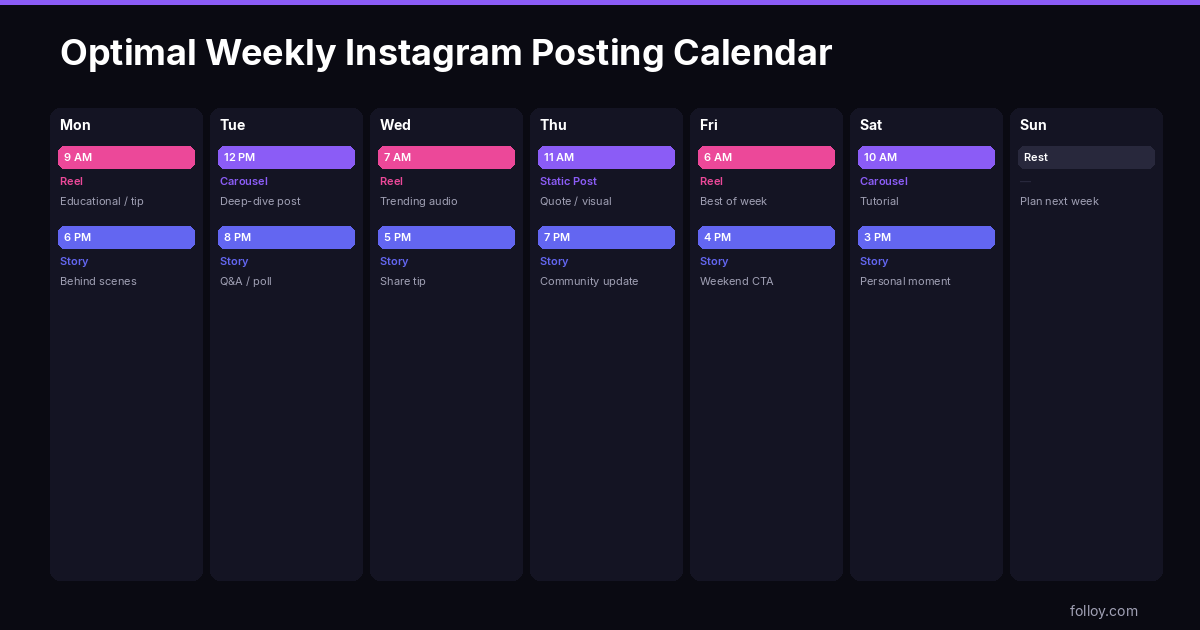
This calendar assumes a creator with 5-8 hours per week for Instagram content. Adjust the Reel frequency based on your production capacity, but maintain daily Stories regardless.
| Day | Format | Notes |
|---|---|---|
| Monday | Reel + 4 Stories | Strongest posting day for most accounts; Stories should include a poll or question sticker |
| Tuesday | 3-5 Stories only | Behind-the-scenes or casual content; no pressure to be polished |
| Wednesday | Carousel + 3-4 Stories | Mid-week carousel gets Explore push during a high-traffic window; Stories that day should mention the carousel explicitly |
| Thursday | Reel + 3-4 Stories | Second Reel of the week; Stories can be a question sticker related to the Reel topic |
| Friday | 4-5 Stories | End-of-week content tends to be community-facing; polls about weekend plans, Q&A followups |
| Saturday | Reel (optional) + 3 Stories | Saturday Reels can outperform during certain niches (lifestyle, food, weekend-relevant content) |
| Sunday | 2-3 Stories | Minimal presence; save the production capacity for Monday |
Total per week: 3 Reels, 1 carousel, 0-1 single feed posts, daily Stories. This allocation reflects the reach data: 3 Reels are doing the growth work, the carousel is generating the saves, and Stories are sustaining the relationship with existing followers every day.
The mistake to avoid
The single most common mistake is spending the most time on the surface that returns the least growth. Many creators put hours into feed-post photography because it feels like “real” content, then sprinkle in a quick Reel as an afterthought. The data on growing accounts in 2026 points the other way: the Reel is the work, the feed post is the postscript. Reverse the proportions on your time and the follower curve usually follows within a month.
A related mistake: treating Stories as a low-priority afterthought because they “disappear after 24 hours.” Stories don’t generate followers directly, but they determine whether your existing followers see your next Reel. Skip Stories for a week and your Reel launch audience – the early batch the algorithm uses to decide whether to push wider – gets weaker. The two formats are connected in ways that are easy to miss if you look at each in isolation.
Frequently asked questions
How many Reels per week is too many?
The ceiling depends on your production quality. Accounts posting 7+ Reels per week with consistently high completion rates can sustain that frequency. Accounts that dilute quality by posting daily tend to see declining average performance, which eventually affects how aggressively the algorithm distributes each new video. For most solo creators, 3-5 high-quality Reels outperform 7 rushed ones in terms of cumulative reach.
Do Stories affect Reel performance?
Indirectly, yes. Stories build the engagement relationship between your account and individual followers. Followers who regularly interact with your Stories are more likely to be in the algorithm’s early test batch for your Reels, and their engagement on that Reel is what triggers wider distribution. Consistent daily Stories is a background habit that strengthens Reel performance over time without directly driving reach in the short term.
Should I post a Reel to my Stories when it goes live?
Yes. Sharing a Reel to your Story on the day it’s published is one of the simplest ways to increase early views from your most engaged followers. That early view spike helps push the Reel into the broader distribution test. Do this within the first hour of publishing, not hours later when the initial distribution window has already passed.
Are carousels better than Reels for educational content?
For some niches, yes. Carousels work better when the content is reference material that viewers want to save and return to – step-by-step processes, numbered lists, templates. Reels work better when the teaching happens through demonstration, storytelling, or any information that benefits from motion and audio. The question is whether your educational content is better consumed by reading at your own pace or by watching once. If it’s the former, carousel; if the latter, Reel.
Why do my feed posts get almost no reach compared to my Reels?
Single-image feed posts rely primarily on the follower feed for distribution, which Instagram’s algorithm heavily filters. Even active followers don’t see every feed post you publish. Reels and carousels get pushed to Explore and non-followers; standard feed posts largely don’t. This is not a bug in your account – it’s the design of how Instagram allocates reach across formats. The fix is reallocating time from single-image posts to Reels or carousels, not trying to optimize feed photos for growth.
How do I know if my Stories are keeping followers engaged?
Check Story analytics: Instagram shows you the view count per frame and where viewers exit the sequence. A healthy Stories exit rate is gradual – losing 10-15% of viewers per frame is normal. If you’re losing 40%+ on the second frame, the first frame is not doing its job of prompting a swipe to continue. Also watch your DM volume from Stories over time – a growing DM rate from Stories is a strong signal that the content is building relationships, not just being passively consumed.
What readers are saying
Real reactions from creators in the Folloy community.
This settled an argument i’ve been having with my business partner for months. Reels for reach, stories for the audience you already have — putting it that simply made our whole content plan click.
the “stories don’t grow you, they retain you” line is going on a sticky note above my desk. been wasting energy expecting stories to bring new followers.
so feed posts really are mostly for the profile-visit impression now? makes sense, i’d basically stopped getting reach from static posts.
yeah pretty much — i treat my grid as a portfolio now, not a growth engine. reels do the reaching.